PROOF SHEET / EXPORTED FILES
What changed on the page?
A PDF can show a number as a text object, a photograph of the printed page, or an image with invisible text behind it. Here’s what the exported file contained in three browser tests.
Searchable scan: 1840 → 1940
Only the image painted the original number. Fieldwork excluded the invisible text, recognized the printed digits, reconstructed the selected area and added a selectable replacement. These crops are from the PDFs rendered in Poppler, independently of the editor.
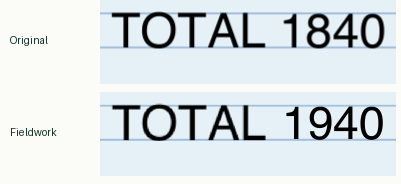
Download original fixture · Download the edited scan
Native text and interactive forms
On page 1 of the sample packet, Tuesday became Friday in the original text object. Independent extraction found Friday and no Tuesday. On page 2, PRINTS is new selectable type on the image. On page 3, Harper Cole is stored in the Recipient field, which remains interactive.
Original sample packet · PDF exported from the hosted editor
Where the methods stop
Native editing is for short runs; it does not reflow a document. Scan repair works best on simple backgrounds: confirm every OCR word and inspect the result. Signed, encrypted, XFA and detected preservation-sensitive documents open read-only. Visual correction is not secure redaction.